
Subquery operator in AppLogs query language
The subquery operator helps you execute more than one condition and aggregation function in a single query and shows the result as a separate, named column.
Syntax
sub_query [(<condition> <aggregation function>) as "<column name>"]
| Parameter | Description |
|---|---|
| sub_query | This is the keyword that starts a subquery. Add more than one subquery block to the same search query to get more than one result column. |
| [ ] | Square brackets mark the start and end of the subquery. |
| ( ) | Parentheses enclose the condition and the aggregation function together. |
| <condition> | This is the filter that selects the logs for this subquery. You can combine constraints and add a Time condition such as Time>$now-30m to limit the subquery to a period. This condition applies only to this subquery. |
| <aggregation function> | This is the calculation to run on the logs that match the condition. The supported functions are count(*), count_distinct, sum, avg, min, max, and sd. |
| as | This is the keyword that assigns a name to the result column. It is required. |
| "<column name>" | This is the name of the result column. Enter it in double quotation marks. It appears as the column header in the results. |
Use cases and queries
Use the count operator
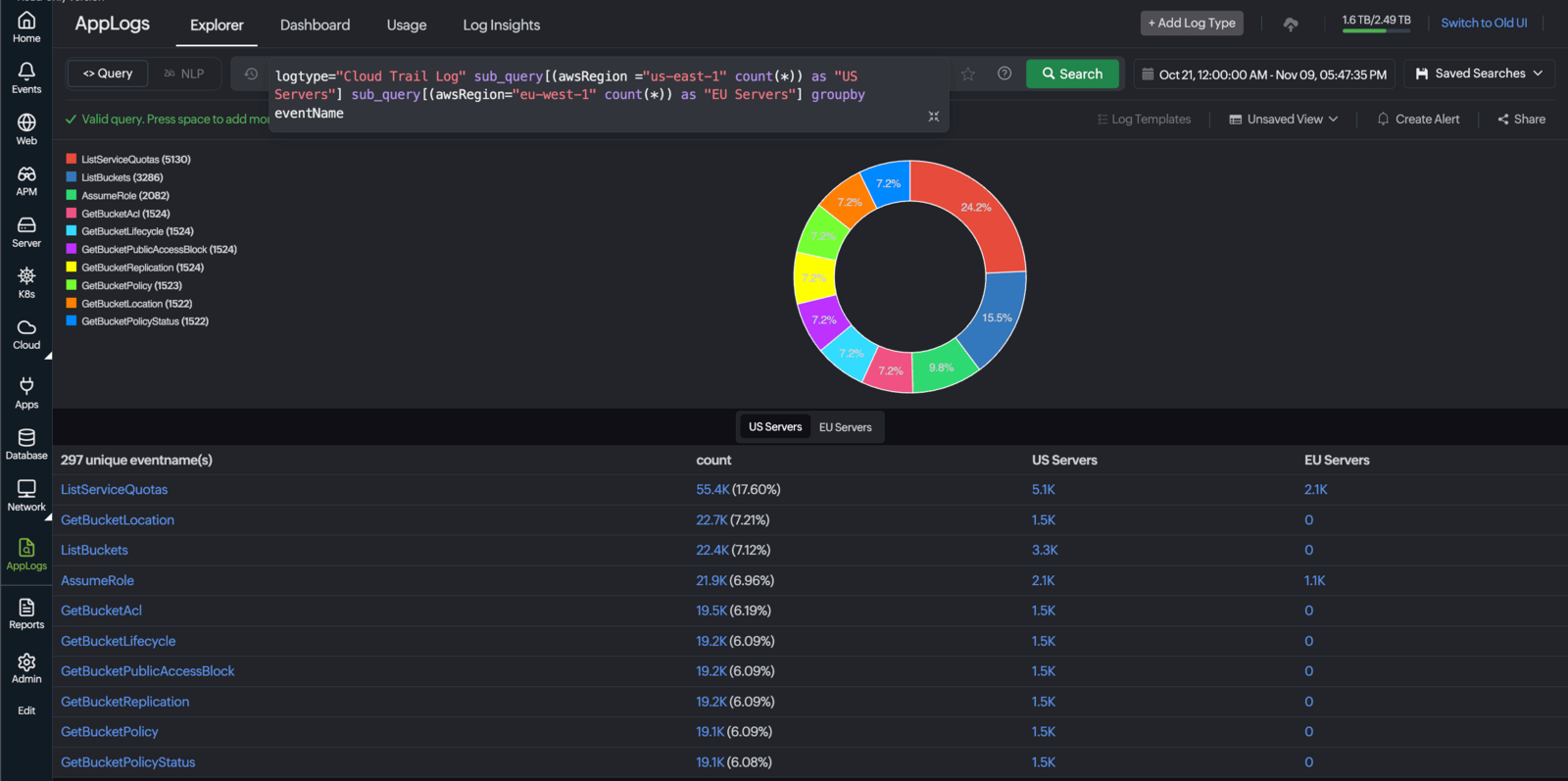
Add the count operator to determine how many log events share the same value. Combined with subqueries, the count operator returns the number of log lines that match the different groups of events. You can compare the groups side by side and spot unusual activity without running separate searches.
logtype="Cloud Trail Log" sub_query[(awsRegion="us-east-1" count(*)) as "US Servers"] sub_query[(awsRegion="eu-west-1" count(*)) as "EU Servers"] groupby eventName
Use an aggregation function other than the count
You can use any aggregation function inside a subquery. You can compare the results side by side to identify URLs with slower response times and investigate potential performance issues.
The following query calculates the average response time of IIS access logs for successful and failed requests:
logtype="IISAccessLogs" sub_query [(statuscode=200 avg(responsetime)) as "success"] sub_query [(statuscode>=400 avg(responsetime)) as "failure"] groupby url
Use a time condition in a subquery
Add the Time operator inside the subquery to restrict that subquery to a specific period.
The following query counts successful and failed IIS requests for the last 30 minutes and the last five minutes, grouped by the URL. If a URL fails in both windows, the issue is ongoing. If it fails only in the 30-minute window, it has cleared.
logtype="IISAccessLogs" sub_query[(Time>$now-30m and statuscode=200 count(*)) as "30m success"] sub_query[(Time>$now-30m and statuscode>=400 count(*)) as "30m failure"] sub_query[(Time>$now-5m and statuscode=200 count(*)) as "5m success"] sub_query[(Time>$now-5m and statuscode>=400 count(*)) as "5m failure"] groupby url
Use groupby with timeslice
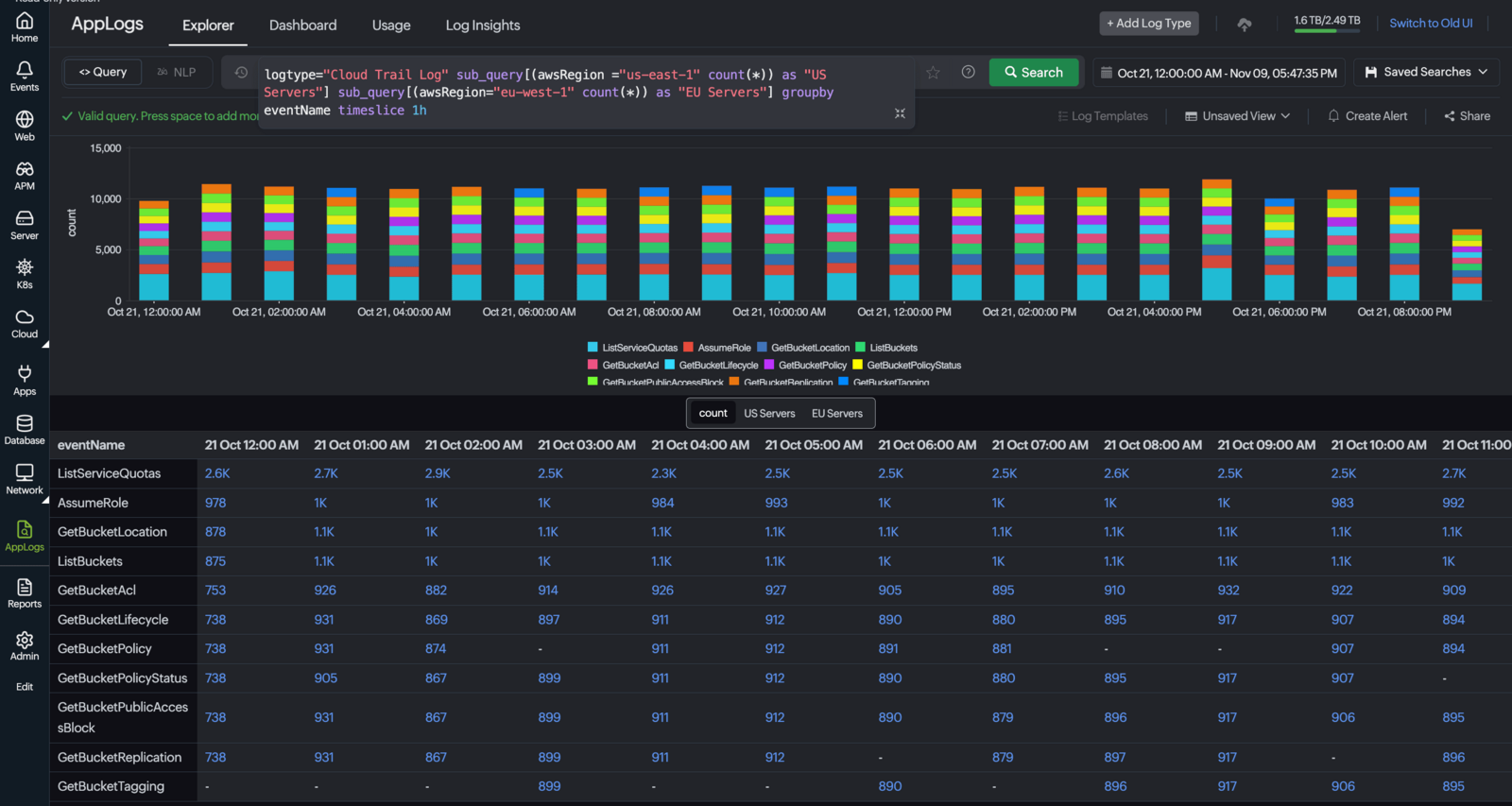
Add timeslice after groupby to see the subquery results for each time interval.
logtype="Cloud Trail Log" sub_query[(awsRegion ="us-east-1" count(*)) as "US Servers"] sub_query[(awsRegion="eu-west-1" count(*)) as "EU Servers"] groupby eventName timeslice 1h
Each subquery is evaluated independently, so the condition in one subquery does not affect the others.
Troubleshooting subquery
The following are issues you might come across while using the subquery operator:
- For a field value with no matching logs in a subquery, the column shows zero or N.A.
- The query bar supports automatic field suggestion that shows the field name and aggregation functions as you type inside the square brackets.
- An incomplete subquery shows a validation error until you add the closing parentheses and the closing brackets.
- You can use multiple subqueries in the AppLogs query bar. The subquery operator is also supported in alerts and saved searches.
- Use the groupby operator only at the end of the multiple subquery blocks. You cannot add more than one groupby operator in a single subquery.
Related articles
-
On this page
- Syntax
- Use cases and queries
- Troubleshooting subquery