Discovery Issues in AWS monitoring
Discovery Issues in Site24x7's AWS monitoring help identify permission-related problems that prevent cloud resources from being discovered and monitored.
When the IAM role associated with your AWS monitor lacks required permissions, certain services or regions may not be visible. Discovery Issues highlights these gaps with clear reasons and error details, so you can take action quickly.
Use cases
In real-world AWS environments, Discovery Issues become essential during onboarding, governance changes, and troubleshooting.
- For example, when a new AWS account is integrated with a limited IAM role, some services like S3 or RDS may not appear in monitoring. Discovery Issues helps identify that specific permissions, such as list or describe actions, are missing, allowing teams to fix the role quickly.
- In organizations using Service Control Policies, access restrictions can override IAM permissions. Even when roles appear correctly configured, discovery may fail. Discovery Issues clearly indicates that the restriction comes from an SCP, reducing confusion and speeding up resolution.
- It is also useful during cloud audits and migrations. When teams restructure accounts, apply stricter security policies, or introduce permissions boundaries, monitoring gaps can occur. Instead of manually validating each service, Discovery Issues provides a centralized view to confirm whether all required permissions are in place.
Benefits of Discovery Issues
Discovery Issues provides you with the following benefits:
- Clear visibility into permission-related gaps and improves visibility into AWS resource discovery failures.
- Identifies exact permission issues and blocked API actions.
- Reduces time spent on troubleshooting and debugging.
- Ensures complete monitoring coverage across services and regions.
- Supports governance and compliance by highlighting policy restrictions.
Why Discovery Issues is important?
Accurate cloud monitoring depends on proper permissions. If access is restricted, resource discovery becomes incomplete and leads to blind spots in monitoring.
Discovery Issues ensures you know exactly where and why access is failing, helping maintain full visibility across your AWS environment.
What problem does Discovery Issues solve?
Site24x7 relies on IAM roles to discover AWS resources such as EC2 instances, RDS databases, and S3 buckets.
In many environments, access is restricted due to IAM policies, Service Control Policies, permissions boundaries, VPC endpoint policies, or resource-based restrictions. These limitations can silently block API calls required for discovery.
Discovery Issues surfaces these failures and provides precise details about the blocked action and the policy causing it.
Where to access Discovery Issues in Site24x7?
You can access the Discovery Issues through any of the following ways:
From the Service View page:
- Navigate to Cloud > AWS > Service View.
- Identify services with warning indicators.
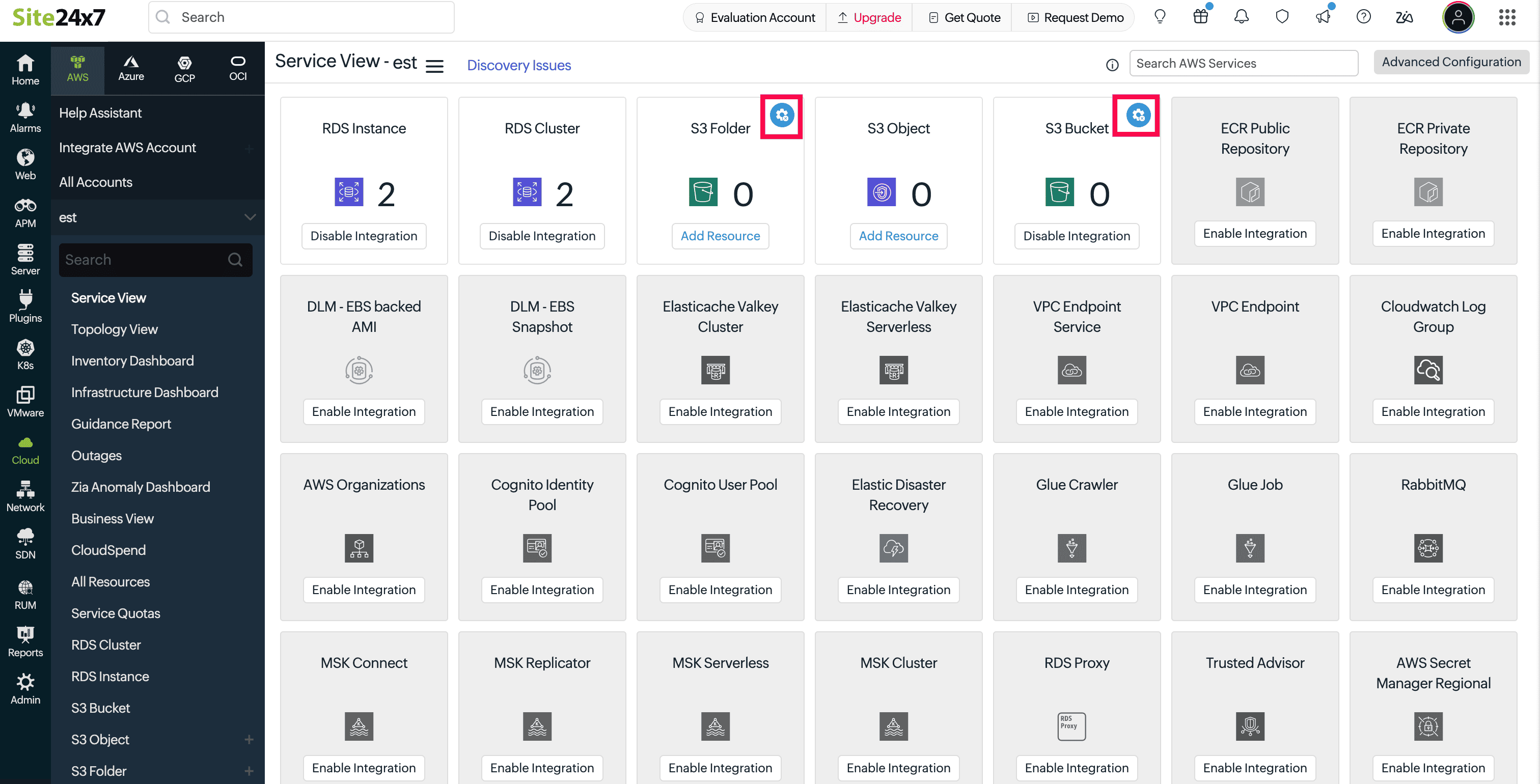
- Click Discovery Issues to view all issues across services and regions.
From a specific AWS service
- Navigate to Cloud > AWS > select any configured AWS monitor.
- Click Discovery Issues.
- Analyze issues limited to that service.
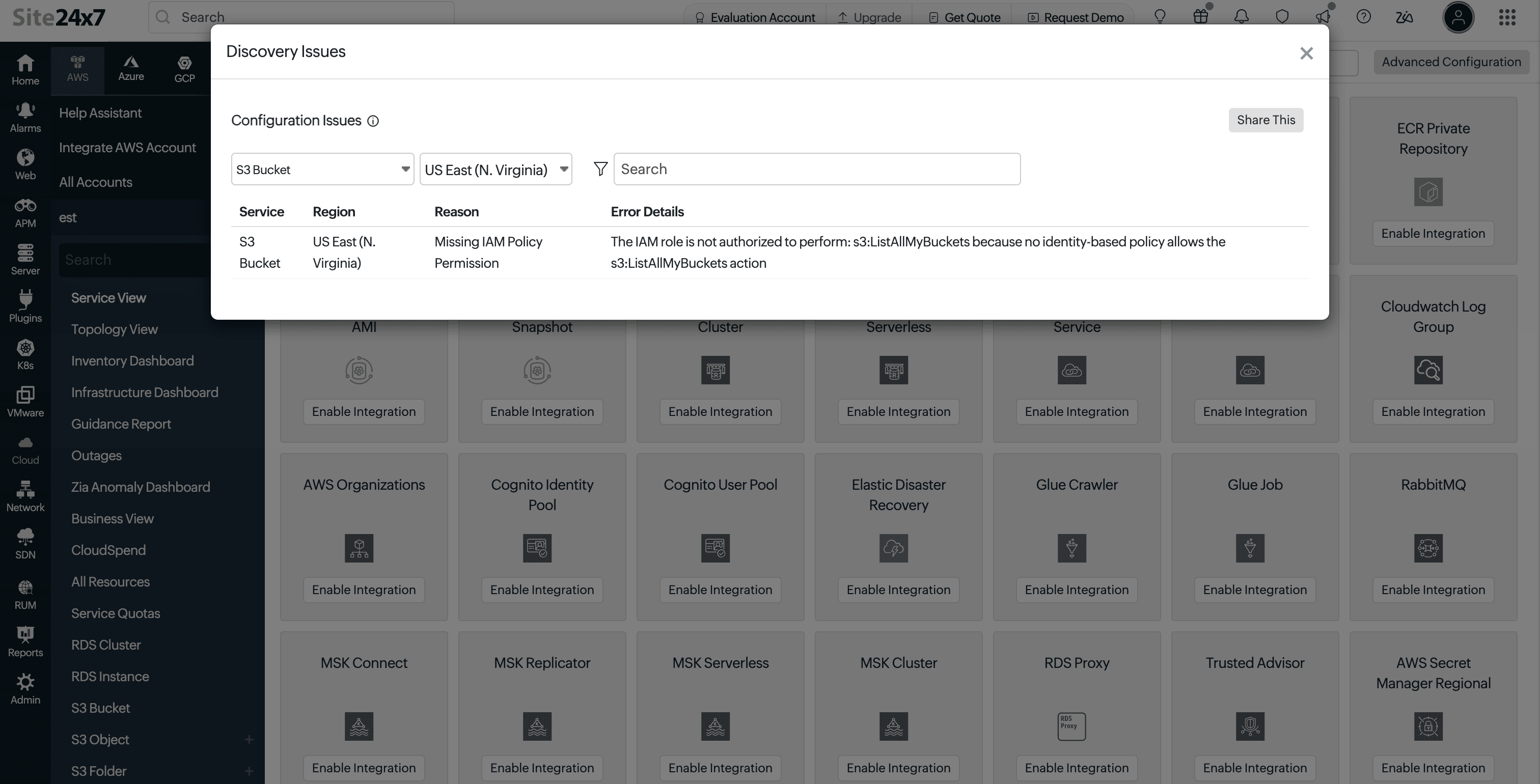
What information is displayed?
When you click Discovery Issues, it opens a detailed view of configuration issues identified for the selected AWS monitor. Each issue highlights a specific permission or policy restriction that is affecting resource discovery.
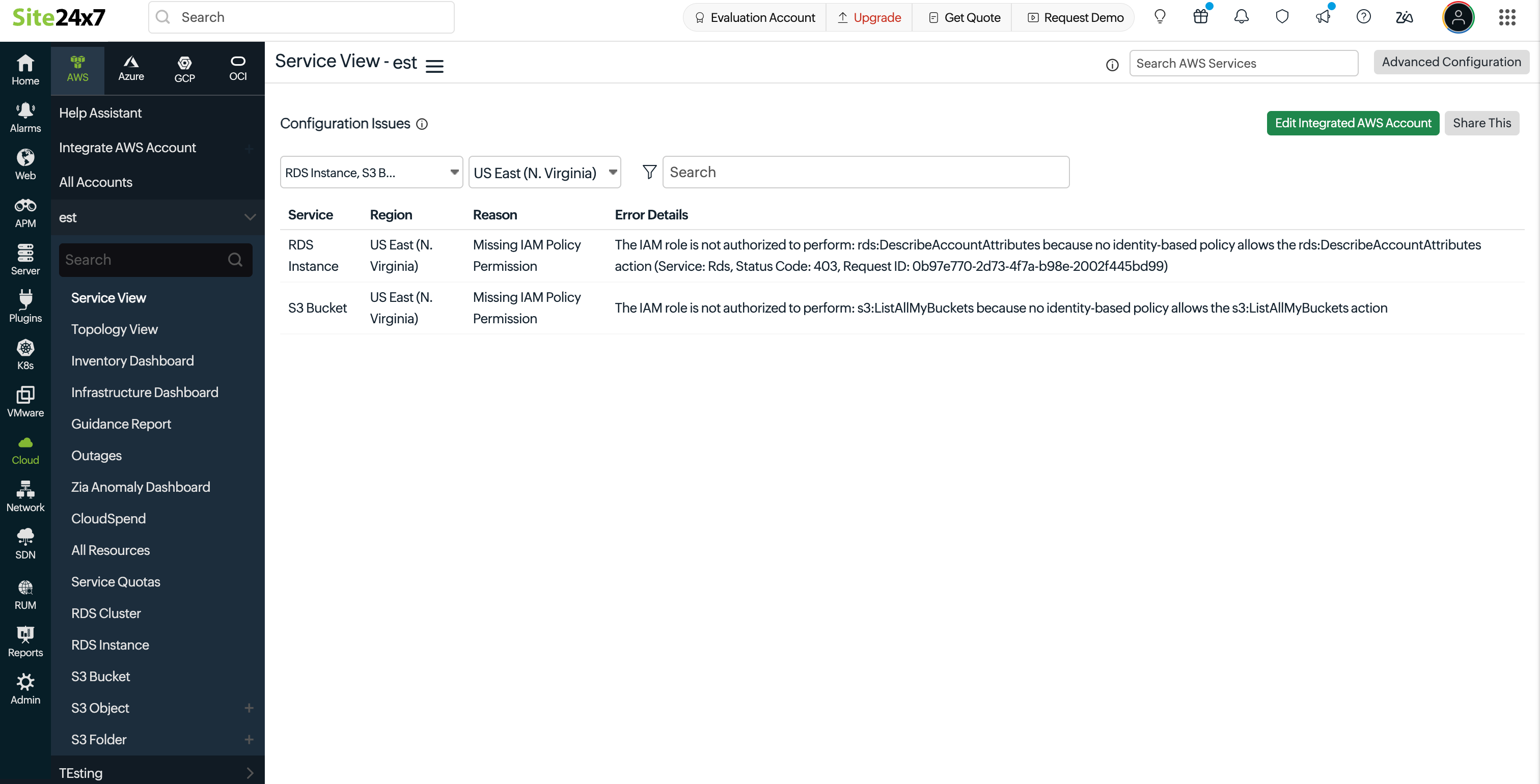
Each issue displays the following details to help you understand and fix the problem quickly:
- Service: The AWS service that could not be discovered or fully monitored. This helps you identify exactly which service is impacted.
- Region: The AWS region where the issue occurred. This helps determine whether the issue is limited to a specific region or present across multiple regions.
- Reason: A short explanation of what is blocking access. This indicates the type of restriction, such as missing permissions or policy-based denial.
- Error Details: The exact AWS API call that failed, along with the error message returned. This provides clear insight into what permission is required and what needs to be updated.
Common issue types
Discovery Issues groups permission failures into clear categories so you can identify the root cause without digging through policies manually:
- Missing IAM policy permission: The IAM role does not include the required action. For example, missing Describe or List permissions needed for resource discovery.
- Blocked by Service Control Policy (SCP): An organization-level policy is restricting access, even if the IAM role allows it. This is common in multi-account setups under AWS Organizations.
- Explicit deny in IAM policy: The IAM role includes a deny rule that overrides any allowed permissions. Explicit denies always take precedence.
- Blocked by resource-based policy: The resource itself, such as an S3 bucket or Lambda function, has a policy that restricts access from the monitoring role.
- Restricted by permissions boundary: A permissions boundary limits the maximum permissions the IAM role can have, preventing certain actions even if they are allowed elsewhere.
- Blocked by VPC endpoint policy: A VPC endpoint policy is restricting access to AWS services, which can block API calls made during discovery.
Filtering and search options
You can narrow down issues using built-in filters:
- Service filter to view selected AWS services.
- Region filter to focus on specific AWS regions.
- Search bar to filter by service name, region, reason, or error details.
When a region is selected, only relevant services with issues in that region are shown.
Exporting and sharing reports
The Share This option allows you to export or share discovery issues:
- Download as PDF for reporting.
- Export as CSV for analysis.
- Send reports via email.
Exports include only the currently filtered data, making it easier to share focused insights.
How to resolve discovery issues
- Review the Reason column to understand the restriction.
- Check Error Details for the failed AWS action.
- Update the required permissions in IAM roles, SCPs, or related policies.
- Re-run discovery or wait for the next cycle.
- Disable the service from discovery, if not required.
Once permissions are corrected, the issues are automatically cleared.
Users with edit permissions can directly access the monitor configuration using the Edit Integrated AWS Account option to update IAM roles and policies.
FAQs
1. Why is the issue not resolved after granting permissions in AWS?
After updating the required AWS permissions, it may take 1 to 6 hours for the next discovery and validation cycle to recheck the permissions and reflect the changes.
If you want to initiate the recheck immediately, either:
- Click Poll Now on the Amazon monitor.
- Or edit the Amazon monitor and click Save without making any changes.
This triggers an immediate recheck instead of waiting for the next scheduled discovery cycle.
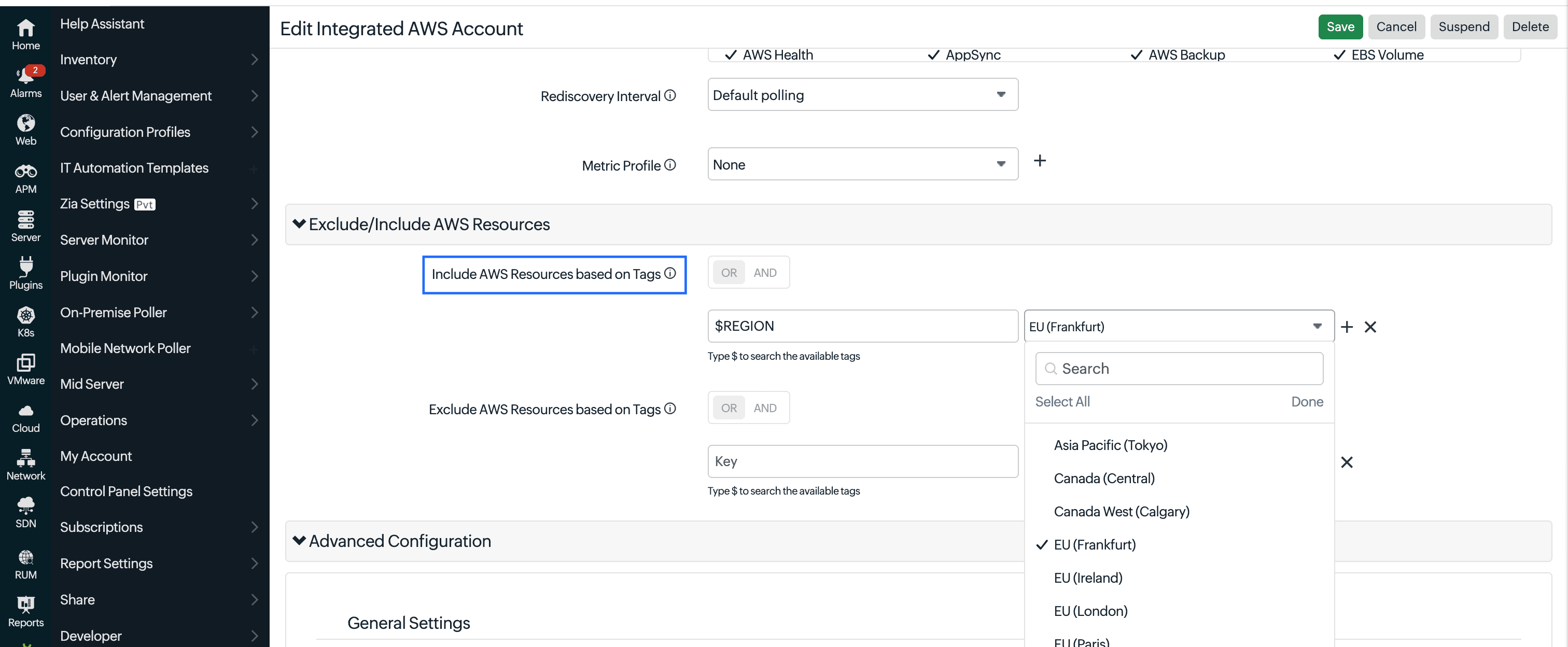
2. I have a "Blocked by Service Control Policy (SCP)" error. How do I fix it?
By default, authorization is performed using the us-east-1 region. If this region is restricted by an SCP, discovery may fail.
To fix this:
- Specify an allowed region or the region where your resources exist in the Include AWS Resources based on Tags filter.
- Wait for the next discovery cycle to complete.
This ensures discovery runs using a region permitted by your SCP.
3. Why are AWS Health and Trusted Advisor resources not discovered after granting permissions?
Even if permissions are granted, these services require an AWS Business or Enterprise Support plan. Without it, the APIs are not accessible, so resource discovery will not work.
4. How do I disable a service from discovery?
Go to the Edit page of the required integrated AWS monitor. Unselect the service that you do not wish to be discovered from the Services to be Discovered field.
5. How do I verify the permissions for each service?
The required permissions for each supported service is listed in the Policies and permissions page.
6. Why am I seeing the "Authentication Failed: Invalid Role ARN" error?
This error indicates that Site24x7 could not authenticate with your AWS account because the IAM Role ARN or its trust relationship configuration is incorrect.
To resolve this issue, verify that:
- The Role ARN configured in the integrated AWS account is correct.
- The External ID configured in Site24x7 matches the External ID specified in the IAM role's trust relationship.
- The AWS Account ID in the trust relationship policy matches the Site24x7 integration configuration.
- The IAM role exists and can be assumed by Site24x7.
After making the necessary corrections, click Edit Integrated AWS Account, update the configuration if required, and click Save. Site24x7 will reauthenticate the AWS account, and the error will be cleared if the authentication is successful.
Related articles
-
On this page
- Use cases
- Benefits of Discovery Issues
- Why Discovery Issues is important
- What problem does Discovery Issues solve
- Where to access Discovery Issues in Site24x7
- What information is displayed
- Common issue types
- Filtering and search options
- Exporting and sharing reports
- How to resolve discovery issues
- FAQs
- Related articles