
Application Discovery in Apps
Application Discovery helps you automatically detect applications running across your servers and quickly deploy monitoring plugins from a single interface. Instead of manually identifying applications and configuring monitoring one by one, Application Discovery provides instant visibility into your environment and simplifies plugin deployment across servers.
Use cases
Application Discovery is useful when you want to:
- Quickly identify running applications across servers.
- Reduce manual monitoring setup effort.
- Standardize plugin deployment across environments.
Prerequisites
Ensure the following:
- The server monitor is already added in Site24x7.
- The required monitoring agent is installed on the server.
- The server has sufficient permissions for application detection and plugin deployment.
- IT Automation must be enabled on the server monitor for plugin deployment.
Access Application Discovery
- Log in to your Site24x7 account.
- Navigate to Apps > Application Discovery.
- The discovered applications running across your servers will be displayed.
- Select the applications you want to monitor, and choose the target servers.
- Click Bulk Deploy to deploy plugins across multiple servers at once.
Bulk deployment
With Bulk Deploy, you can select an application and deploy its plugins across multiple servers in a single action. This simplifies large-scale monitoring setup and reduces manual configuration effort.
Smart bulk installation with Installer Script
During bulk installation, Installer Script is automatically executed on target servers to ensure a smooth deployment. This includes:
- Automatically handling all pre-installation requirements.
- Installing required dependencies and modules.
- Detecting and configuring the appropriate Python environment.
This ensures that the plugin is installed correctly and runs without any issues on the target servers.
Supported environments
Parameters displayed
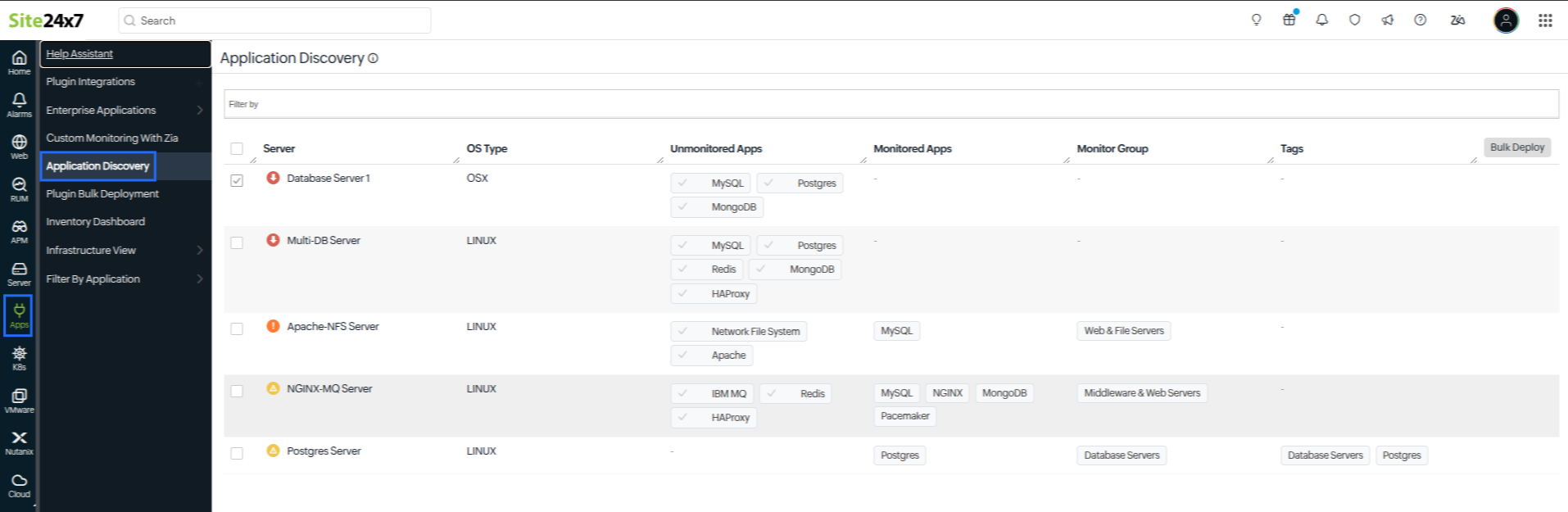
| Parameter | Description |
|---|---|
| Server | The name of the monitored server. |
| OS Type | The operating system running on the server. |
| Unmonitored Apps | Applications detected but not yet monitored. |
| Monitored Apps | Applications currently being monitored. |
| Monitor Group | Associated monitor groups configured for the server. |
| Tag | Tags assigned for categorization and organization. |