






ISP monitoring to track ISP performance, latency, and connectivity

  • Know exactly which hop is breaking your network
  • Verify ISP SLA commitments against actual delivery
  • Compare ISP reliability across 130+ global locations

No credit card required · 30-day full-feature trial · Free plan available

ISP Latency Monitoring Dashboard
Trusted by
Ametek Logo Endurance logo Ford Motor Company logo GoDaddy logo HubSpot Logo Kimberly Clark Logo Papa Johns Logo WWEcorp Logo Ametek Logo Endurance logo Ford Motor Company logo GoDaddy logo HubSpot Logo Kimberly Clark Logo Papa Johns Logo WWEcorp Logo

What does Site24x7's ISP monitoring tool track?

Site24x7 monitors how ISPs and transit providers handle your traffic. Every data point — from hop-level latency to route changes — is collected, visualized, and alertable. Act before users complain, not after.

Identify high-latency paths across your ISP network

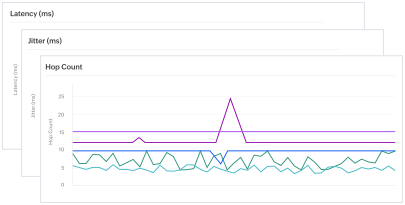
Run traceroutes from 130+ global locations and compare latency across every network path. Pinpoint exactly which hop or interface introduces the most delay. A global latency heat map gives you an at-a-glance view of connection quality across every monitored region.

Dashboard illustration representing ISP latency monitoring across network hops

Verify ISP SLA compliance and manage vendor performance

Continuously measure availability, latency, hop count, AS number, and jitter for every network path. Compare metrics directly against each ISP's committed SLA thresholds. When it's time to renegotiate contracts, historical compliance data gives your team the evidence to negotiate from fact, not frustration.

Dashboard illustration representing ISP SLA performance verification

Analyze hop-to-hop data transfer in detail

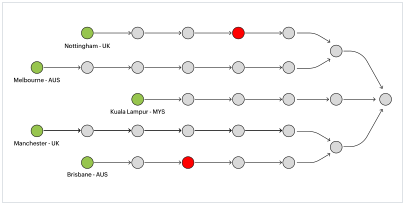
See exactly how your data moves through every node in both directions of each round-trip. Site24x7 surfaces latency, AS number, AS name, IP prefix, and provider changes at every hop. Filter by link delay threshold, highlight specific paths, and catch asymmetric routing before it reaches your users.

Network diagram illustration representing hop to hop ISP traceroute analysis

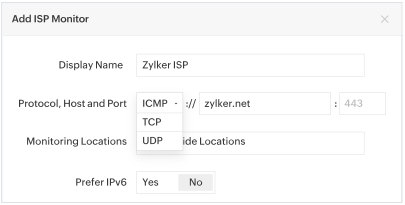
Monitor ISP connectivity across ICMP, TCP, and UDP protocols

ICMP covers basic connectivity and round-trip time across the network path. TCP validates application-layer reachability on specific ports. UDP assesses performance for latency-sensitive services like VoIP and video streaming.

Dashboard illustration representing ISP monitoring across ICMP, TCP, and UDP protocols

Set granular thresholds and alerts at each hop

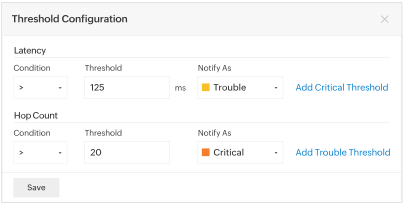
Define threshold limits for latency, jitter, and AS number at every point along the route. Configure thresholds globally or customize them per monitoring location. If an untrusted provider starts handling your traffic, you get an instant alert with the context to act.

Dashboard illustration representing ISP threshold configuration and alerts

Get proactive alerts for ISP outages and degradation

The moment performance crosses your thresholds, Site24x7 notifies your team instantly. Alerts arrive via email, SMS, Slack, Teams, PagerDuty, ServiceNow, and more. Every alert includes root cause analysis so your team spends less time diagnosing and more time resolving.

Dashboard illustration representing proactive ISP alerts for outages and degradation

Gain broad visibility into ISP health across regions

Individual traceroutes show one path at one moment in time. Site24x7 aggregates data from 130+ locations continuously to surface patterns point-in-time checks miss. Correlate ISP health trends with APM data for a complete picture of how network performance affects your applications.

Dashboard illustration representing broad ISP health visibility across regions

Who uses ISP monitoring — and why

ISP performance issues rarely announce themselves. Here are three scenarios where ISP monitoring turns uncertainty into a clear, actionable answer.

Multi-site enterprises icon

Multi-site enterprises

Comparing ISP performance across regions
The blind spot

A provider delivering reliable connectivity in Frankfurt may introduce significant latency on the Singapore path. A CDN misconfiguration can make your application unreachable from one region while every other location stays green. Without monitoring, the only signal you get is a user complaint — by which point the problem has been running for hours.

How Site24x7 helps

Site24x7 runs continuous traceroutes, measuring latency, jitter, packet loss, and availability across every regional connection simultaneously — turning ISP vendor evaluation from a subjective conversation into a data-backed decision.

Managed service providers icon

Managed service providers

Verifying ISP SLA compliance for clients
The blind spot

When a client's application underperforms, the first question is always whether the problem sits with the managed infrastructure or the ISP. Without objective network path data, that question can take hours to answer — and in a client relationship, that ambiguity is expensive.

How Site24x7 helps

Site24x7 gives MSPs hop-level visibility into every client's network path, continuous SLA compliance tracking, and exportable performance reports. When a client escalates, the MSP can isolate the issue to a specific ISP node in seconds and hand the provider a timestamped report to resolve the dispute faster.

Network operations teams icon

Network operations teams

Investigating BGP route changes and unexpected traffic rerouting
The blind spot

BGP route changes are among the most disruptive and least visible events in network operations. When an ISP modifies the AS path your traffic follows — through a configuration change, a peering dispute, or a hijacking incident — most teams don't discover it until the help desk queue is already full.

How Site24x7 helps

Site24x7 continuously baselines the AS number and AS path at every hop. The moment a deviation is detected — a new AS number at a node, an unexpected transit provider, or a sudden path length increase — an alert fires with the exact hop, location, and modification, before users have a chance to report it.

Frequently asked questions about ISP monitoring

What exactly does ISP monitoring measure that a ping test doesn't?

A ping test tells you whether a host is reachable. ISP monitoring tells you everything in between — the full traceroute path, latency and packet loss at every individual hop, the autonomous system (AS) number of each node, jitter across the path, and whether the transit provider carrying your traffic at the last hop is the one you expect. A ping result of 200ms tells you nothing about where those 200ms are being spent or which provider is responsible.

How does hop-by-hop analysis help isolate ISP-caused latency from application-layer issues?

When latency spikes, the cause could be anywhere — your application, your server, your CDN, or your ISP. Hop-by-hop analysis measures round-trip time at every node along the traceroute path. If latency is consistent across your infrastructure hops but spikes at a specific AS boundary, the problem is in the external network path — not your stack. That distinction is the difference between spending three hours debugging your application and making one call to your ISP.

What is AS number monitoring and why does it matter?

Every network on the internet is identified by an autonomous system number. ISP monitoring tracks the AS number at every hop along your traceroute. If the AS number at a specific hop changes unexpectedly, it means your traffic is being handed off to a different provider than usual — a BGP route change. Site24x7 alerts you the moment an uninformed AS path modification occurs, so you know when your traffic is transiting a provider you didn't agree to.

How does Site24x7 detect unauthorized BGP route changes in real time?

Site24x7 continuously baselines the AS path your traffic follows across all monitored locations. When a deviation is detected — a new AS number appearing at a hop, a transit provider change at the last mile, or a path length increase — it's flagged immediately. This matters because BGP hijacking and unauthorized rerouting often precede performance degradation or security incidents, and most teams don't discover them until users are already affected.

Can ISP monitoring differentiate between packet loss at an ISP node versus a transit provider?

Yes. Because Site24x7 tracks packet loss at every individual hop rather than just end-to-end, it can pinpoint whether loss is occurring within your ISP's network, at the handoff between your ISP and a transit provider, or deeper in the transit path. This level of granularity is critical when you need to assign responsibility for an SLA breach to a specific provider rather than the network path as a whole.

What is jitter and why is it a more useful metric than latency alone for ISP performance monitoring?

Latency measures the average round-trip time between two points. Jitter measures the variance in that latency over time. A connection with 50ms average latency but high jitter is far more damaging to real-time applications — VoIP, video conferencing, financial transactions — than a connection with 80ms average latency and low jitter. ISP monitoring that only tracks average latency can miss chronic instability that's actively degrading your application performance.

How does multi-location traceroute monitoring reveal regional ISP performance differences?

The same ISP can perform very differently depending on where your traffic originates. A provider routing traffic efficiently from London may have congested peering in Singapore. Running traceroutes from 130+ global locations simultaneously lets you map ISP performance by region, identify which locations are consistently underperforming, and make data-backed decisions about which providers to use for which regions.

Can I set thresholds at the individual hop level rather than just end-to-end?

Yes. Site24x7 lets you configure thresholds for latency, jitter, and AS number at the hop level — not just for the overall path. This means you can alert specifically on a problematic intermediate node rather than waiting for end-to-end metrics to cross a threshold. You can also set location-specific thresholds to account for the fact that normal latency ranges vary significantly between regions.

How does ISP monitoring support SLA verification with hard performance data?

Site24x7 continuously measures availability, latency, jitter, and packet loss against configurable thresholds tied to your SLA commitments. When an ISP falls below a committed metric — say, latency exceeding the agreed ceiling for more than a defined period — an alert fires and the breach is logged. Performance reports capturing the exact timestamps, affected locations, metrics, and hop-level data can then be exported and shared directly with your ISP's account team as verifiable evidence.

What is MTU monitoring and when does it become relevant in ISP performance troubleshooting?

Maximum transmission unit (MTU) defines the largest packet size that can travel across a network path without fragmentation. MTU mismatches between your network and your ISP's infrastructure cause silent performance degradation — packets get fragmented or dropped, throughput drops, and applications slow down without any obvious error. Site24x7 measures MTU from every monitoring location, making it easier to identify path MTU issues before they compound into larger connectivity problems.

How does ICMP, TCP, and UDP protocol support affect what ISP monitoring can detect?

Different protocols traverse networks differently. ICMP is the standard for traceroutes but is sometimes rate-limited or unprioritized by ISP routers, which can produce misleading latency readings. TCP and UDP monitoring lets you measure the actual path your application traffic follows, giving you a more accurate picture of real-world ISP performance for specific services and ports rather than just the network layer in isolation.

How is ISP monitoring different from network performance monitoring?

Network performance monitoring focuses on devices and infrastructure within your own environment — interface utilization, device health, traffic flows across your managed network. ISP monitoring focuses on what happens to your traffic after it leaves your perimeter, tracking external network paths, transit provider behaviour, and ISP-level metrics that your internal monitoring tools have no visibility into.

Start monitoring your ISP performance today

Join more than 13,000 customers who trust Site24x7 to monitor their websites, servers, and cloud infrastructure—24/7, from more than 130 locations worldwide.

Start 30-day free trial Try now, sign up in 30 seconds
Looking for assistance? We’re here to help!

Want to learn more?

  • Personalized product demo
  • Proof of concept for set up
  • 30-day, unlimited, free trial
Request a Demo

Interested in our services?

  • 24/5 customer support
  • Flexible and competitive pricing
  • Better ROI
Get quote