How to build a resilient incident management workflow using ilert
 Your payment API suddenly returns 503 errors. Within seconds, your infrastructure monitors, application checks, and dependency monitors begin generating their own alerts. And while the dashboards keep flashing, the clock is still running. Your customers are waiting, internal teams are asking for updates, and engineers are trying to separate the real problem from the noise before the situation gets worse. That gap between "alert fired" and "right person has the right context" is where incident response breaks down. And closing it is exactly what an effective incident management workflow is designed to do.
Think of it as a relay. Site24x7 runs the first leg, detecting problems and describing them accurately. ilert runs the second, making sure the right person gets that information instantly and in a form they can act on.
The monitoring platforms will never stop collecting data. They collect every minute as servers report CPU spikes, synthetic checks detect slow response times, and real user monitoring captures degraded user journeys from locations around the world.
Collecting those metrics isn't the challenge anymore. The real challenge begins after the alerts start firing.
Without a workflow that automatically sorts and enriches those alerts, engineers often struggle to figure out what's happening. That's where much of the delay in mean time to resolution (MTTR) comes from.
That's why you must build a resilient incident management workflow using ilert. Instead of assembling information from multiple dashboards, engineers receive the context they need from the start.
The modern incident management bottleneck
Modern monitoring environments generate an enormous volume of metrics. Synthetic monitoring, server agents, application monitoring, and real user monitoring continuously generate health signals across your infrastructure.
Without an alert orchestration layer between monitoring and incident response, that volume quickly becomes overwhelming. Engineers end up spending more time filtering alerts than responding to genuine incidents.
Eventually, every alert starts to look equally important, even when it isn’t. That is when important notifications get buried, and engineers begin second-guessing whether the next page really needs their attention. Engineers become slower to respond, important notifications become easier to overlook, and confidence in the alerting system gradually declines.
So, the solution is not simply delivering alerts faster. It's making sure that every alert arrives with enough information for engineers to understand the situation immediately. When engineers don't have to switch between dashboards to investigate what broke, they can spend their time fixing the issue rather than gathering information.
Where Site24x7 and ilert each do their job
To get the most out of the Site24x7 and ilert integration, it helps to understand what each platform is responsible for. While they work together, they solve different parts of the incident life cycle.
Site24x7 is responsible for monitoring, telemetry, automation, and resolution. It runs synthetic checks from more than 130 global locations, collects infrastructure and application metrics, and records detailed diagnostic information whenever something goes wrong. Its role is to detect issues early and provide accurate insight into what happened. ManageEngine has been recognized in the 2025 Gartner® Magic Quadrant™ for Digital Experience Monitoring, reflecting the breadth of Site24x7's observability coverage across synthetic, real user, and infrastructure monitoring.
ilert takes over once an issue has been detected. It receives the alert payloads from Site24x7, uses AI to summarize the available diagnostic data, and routes the incident to the appropriate responder through the right communication channel. It also manages escalations, publishes real-time status pages to keep customers and stakeholders informed during an outage, and automatically closes incidents when Site24x7 reports that the issue has been resolved.
Together, the two platforms create a continuous workflow that takes incidents from detection to resolution with minimal manual involvement.
Do you need ilert if Site24x7 already sends alerts?
Site24x7's built-in alerting is sufficient when one alert maps to one owner, and a quick notification is all that is needed. ilert becomes the better choice when alerts need to reach whoever is on shift, escalation is required if someone does not respond, and the incident needs to be tracked through to resolution. If the alert needs to reach one person and the job is done, Site24x7 alerting covers it. If it needs to reach the right person, be managed until closure, and leave a record behind, that's where ilert adds value.
What makes this integration distinctly valuable
So far, we've covered the problem and how the two platforms divide the work. Now, here's what actually sets this integration apart from a basic webhook forward.
Many monitoring integrations simply forward alerts from one platform to another. This integration goes beyond notification delivery by providing engineers with the context and automation they need to respond faster.
1. Every alert includes a rich diagnostic context
When Site24x7 detects an issue, it doesn't send a basic notification.
Instead, it packages detailed diagnostic information, including the monitor name, failure reason, affected monitoring locations, response time degradation, DNS lookup time, and a direct link to the root cause analysis (RCA) view, into a structured JSON payload.
ilert maps this information directly onto the incident, allowing engineers to understand what failed, where it failed, and how severe the impact is before opening the monitoring console.
2. Intelligent alert grouping reduces alert storms
A single infrastructure problem can trigger failures across multiple dependent services, generating dozens of individual alerts for the same underlying issue. Without correlation, every one of those lands separately, overwhelming engineers before they can even begin to respond.
Site24x7's event correlation solves this at the source. It analyzes incoming alerts, identifies which ones share a common root cause, and consolidates them into a single entry called a Problem. That Problem is what gets sent to ilert as one notification, one incident, one page to the right engineer. No flood, no duplicates, just a clear signal with the full context already attached.
3. AI summarization turns raw monitoring data into readable insights
Raw monitoring payloads often contain far more technical information than engineers can quickly process during an active incident. Two AI layers work together to bridge that gap.
On the Site24x7 side, two distinct AI capabilities contribute. Ask Zia is a conversational query interface—you ask it questions about your monitoring data, and it retrieves insights, surfaces trends, and generates visualizations in response. It does not autonomously analyze alerts; it responds to prompts. Zia Agents are the autonomous component: they monitor alert activity in real time, correlate operational data, execute predefined remediation workflows within guardrails your team controls, and can resolve certain incidents without any human intervention.
On the ilert side, AI summarization reads the structured payload from Site24x7 and generates a concise, readable summary that appears directly in push notifications, Slack, and Microsoft Teams.
Together, they mean engineers do not have to open a dashboard to interpret raw metrics or JSON data. By the time the notification arrives, the incident is already described, contextualized, and accompanied by a suggested path forward.
4. Incidents close automatically after recovery
The integration works in both directions. When Site24x7 detects that the affected resource has recovered, it sends an Up status to ilert, which automatically closes the incident while preserving the complete event timeline.
Zia Agents also enable certain incidents to move from detection to resolution without any human intervention, with the full action log preserved for post-incident review.

Auto-resolution is the default behavior—incidents in ilert close automatically when Site24x7 reports the monitor as Up. Using the Manually Close Incidents When My Monitor Status Changes to Up toggle is only needed if your workflow requires manual closure instead.
5. Deliver alerts through the channels your teams already use
Different teams respond to incidents in different ways. Some rely on phone calls, while others work primarily from collaboration platforms.
ilert delivers Site24x7 alerts through multiple channels:
- Voice calls
- SMS (with local numbers in many countries)
- Mobile push notifications (including smartwatch support, so alerts reach you even when your phone is in silent mode)
- Slack
- Microsoft Teams
- Telegram
- DingTalk
Engineers can acknowledge alerts with a single tap or even by replying to an SMS, helping reduce the chances of missing a critical notification during an outage.
6. On-call schedules ensure alerts reach the right responder
Sending alerts quickly is only useful if they reach the right person. ilert links Site24x7 alert sources directly to on-call schedules and escalation policies, so each alert source, whether it covers production APIs, infrastructure monitors, or synthetic checks, routes to the engineer on shift for that specific environment.
If the initial responder does not acknowledge the alert, ilert escalates automatically to the next person in the rotation, ensuring no page goes unhandled regardless of time zone or shift pattern.
7. Analytics reveal opportunities to improve incident response
Beyond day-to-day incident handling, ilert provides reporting that helps teams improve their operational processes over time. It reports on mean time to acknowledge, MTTR, time spent on call, and time spent per alert, helping teams identify which monitors generate the most noise, where escalation paths slow down, and where threshold tuning would reduce unnecessary interruptions.
Over time, these insights create a feedback loop between monitoring configuration in Site24x7 and incident response policies in ilert, helping teams continuously reduce the volume of alerts that require human attention.
8. Delayed alerting reduces unnecessary after-hours interruptions
Not every alert requires an immediate response.
ilert supports delayed alerting policies, allowing low-priority Site24x7 alerts that occur outside business hours to wait until the next shift instead of waking an engineer unnecessarily. On the Site24x7 side, notification profiles and scheduled maintenance windows complement this by suppressing alerts during planned downtime or off-hours periods at the monitoring level.
Critical incidents continue to notify engineers immediately, while less-urgent issues can be handled during normal working hours. This helps reduce alert fatigue without compromising coverage for high-priority incidents.
Setting up the integration
The integration is quick to configure and typically takes less than an hour to get up and running.

Prerequisites: You need an active ilert account with permissions to create and manage alert sources. You also need to generate and copy the webhook URL from the ilert alert source before configuring the Site24x7 side.
At a high level, the process looks like this:
- In ilert, create a Site24x7 alert source and copy the hook URL.
- In Site24x7, go to Admin > Third-Party Integrations > Add Third-Party Integration and select ilert.
- Paste the hook URL, choose which monitor statuses trigger alerts (Down, Trouble, Critical), and set your integration level.
- Click Save and Test to confirm alerts are reaching ilert.
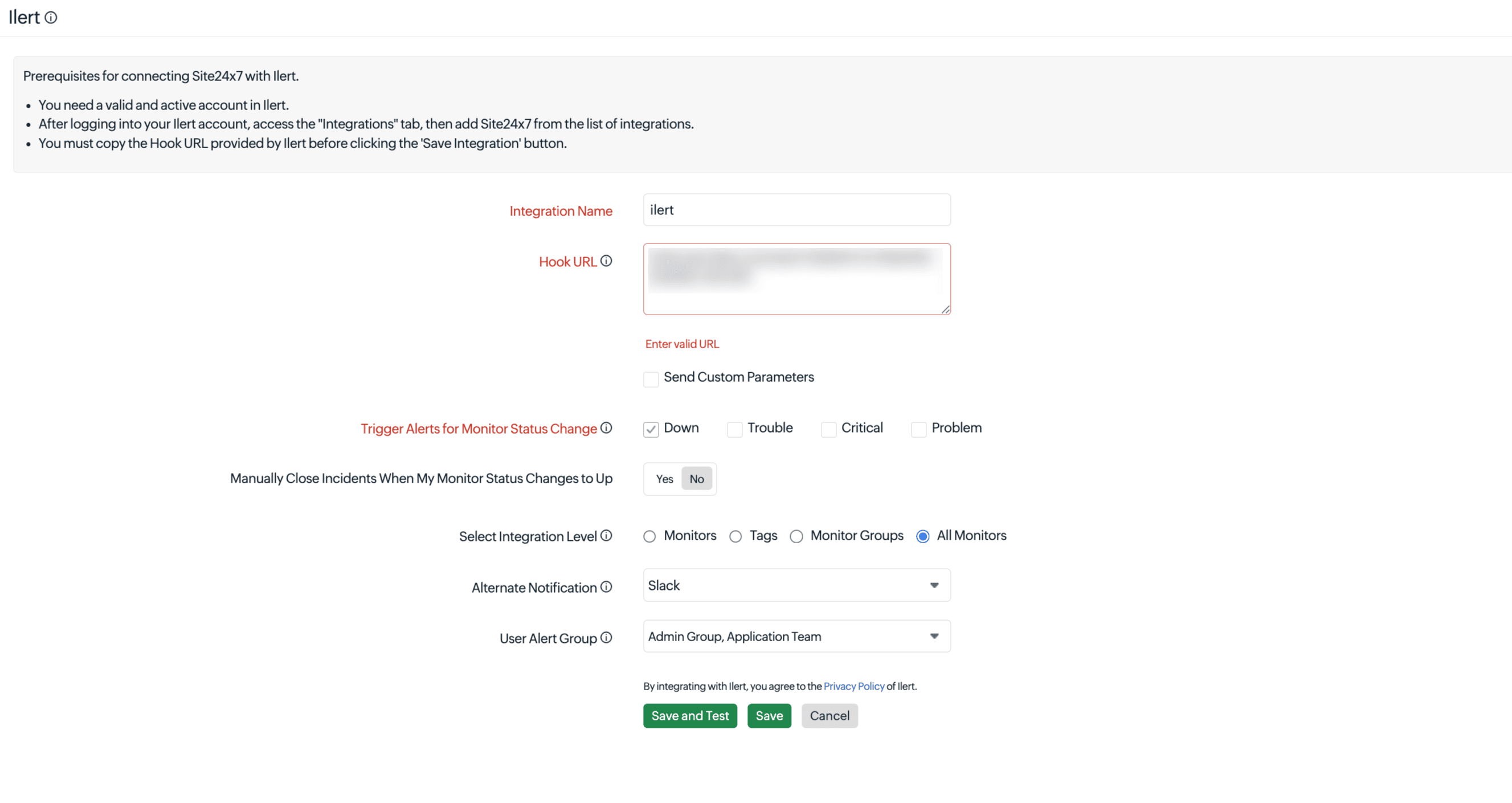
Once the configuration is complete, Site24x7 automatically forwards alerts to ilert, where they are routed, grouped, and managed according to your incident response policies.
For detailed configuration steps, including webhook parameters, routing tags, and status page integration, refer to the official Site24x7 and ilert integration documentation.
Common configuration mistakes to avoid
Getting the integration working is relatively straightforward. Optimizing it for real-world incident response requires a little more attention. Here are some of the most common mistakes to avoid after the initial setup.
- Routing every monitor to the same on-call team: Sending every alert to a single rotation creates unnecessary work. Engineers end up filtering alerts that belong to other teams before they can focus on their own. Use routing tags from the start to ensure infrastructure, application, API, and synthetic alerts reach the right team automatically.
- Escalating after a single failed polling cycle: A single failed poll does not always mean a real incident. Server hiccups and short-lived interruptions can trigger isolated failures that resolve on their own. Require at least two consecutive failed cycles before escalating to Critical to cut transient alerts without missing genuine incidents.
- Using generic alert source names: An alert source named "Site24x7" tells you nothing when multiple incidents are active. Use descriptive names like Site24x7-Production-API or Site24x7-Infra-EU-West so engineers immediately know where an incident originated without opening additional details.
- Leaving the User Alert Group unconfigured: Imagine the integration between Site24x7 and ilert silently breaks overnight. Alerts keep firing in Site24x7, but nothing reaches ilert; no pages, no escalations, no notifications. Your team assumes everything is fine because nothing came through. Without a User Alert Group assigned, that's exactly what happens. Assigning one ensures Site24x7 notifies the right team the moment an integration failure occurs, so the broken connection gets fixed before it costs you a real incident.
Bringing observability and incident response together
Finding the issue is only half the battle; what happens next matters most. Site24x7 and ilert solve two distinct problems that have always belonged together: Site24x7 tells you what is happening across your infrastructure with precision, while ilert makes sure that information reaches the right engineer through the right channel.
You will see the difference the next time an outage hits. Instead of waking up to ten disconnected alerts and jumping between dashboards, your on-call engineer will receive one actionable incident, understand what is affected, and know what to do next.
If you already use Site24x7 for monitoring and want a more structured way to manage incidents after an alert fires, ilert is a natural fit. Set up the integration before the next outage puts it to the test. Start with the Site24x7 ilert integration and have the integration running before the end of the day.
FAQ
1. Does this integration work with all Site24x7 monitor types?
Yes. The integration can be configured for all monitors, specific monitor groups, or individual assets. Monitor type can also be used as a routing tag in ilert, allowing different alert categories such as REST API monitors, server monitors, and synthetic checks to be routed automatically to the appropriate on-call teams.
2. What happens if ilert receives a recovery signal before the incident is acknowledged?
When Site24x7 detects that the affected resource has recovered, it sends an Up status to ilert. ilert automatically closes the incident, even if it hasn't been acknowledged, while preserving the complete incident timeline for future analysis and post-incident reviews.
3. Can the AI summarization handle payloads from multiple monitor types in a single incident thread?
Yes. ilert's AI summarization operates at the incident level, not the individual alert level. When multiple Site24x7 alerts are grouped into a single incident, the AI combines information from all relevant payloads to generate one clear, readable summary. This gives engineers a complete picture of the incident without requiring them to interpret multiple alerts separately.
4. Is there a risk of alert deduplication accidentally merging unrelated incidents?
Not necessarily. The risk is minimal when the integration is configured correctly. ilert uses both the grouping window and routing tags to determine whether alerts belong together. Even if two alerts occur within the same time window, they remain separate incidents when they have different routing tags. Using clear and descriptive routing tags during configuration is the best way to ensure unrelated incidents are never grouped together.
5. What is the difference between monitoring and incident management?
Monitoring is the continuous process of collecting metrics, checking availability, and detecting anomalies across your infrastructure. Incident management is the structured process that kicks in when monitoring surfaces a problem, covering detection, assignment, communication, resolution, and post-incident review. Site24x7 handles the monitoring side, while ilert handles the incident management side. Together, they close the gap between knowing something is wrong and getting the right person working on it.
6. What is event correlation, and how does it reduce alert noise?
Event correlation groups alerts that share a common root cause into a single Problem, so ilert receives one notification instead of dozens. This means the on-call engineer gets one page for one root cause, not a flood of individual alerts for every downstream symptom.
7. What are Zia Agents, and how do they support faster incident resolution?
Zia Agents are AI-powered automation agents in Site24x7 that analyze alerts and execute predefined remediation workflows—such as restarting a service—automatically and within guardrails your team controls, so some incidents resolve without any human intervention.
8. Does the Site24x7 and ilert integration support status pages for customer communication?
Yes. ilert's built-in status pages connect directly to your alert sources and can update automatically when Site24x7 triggers or resolves an incident, with ilert AI drafting the update messages.
Comments (0)